


HOW TO - Install IQmanager® on Windows 8
Goal
Installation of IQmanager® on Windows 8 (32-bit or 64-bit).
Information
Note: In order to install IQmanager® on Windows 8 (32-bit or 64-bit), the computer needs to have VC++ 2005 (x86) installed as a pre-requisite. The installation should be done as the computer Administrator.
Step 1:
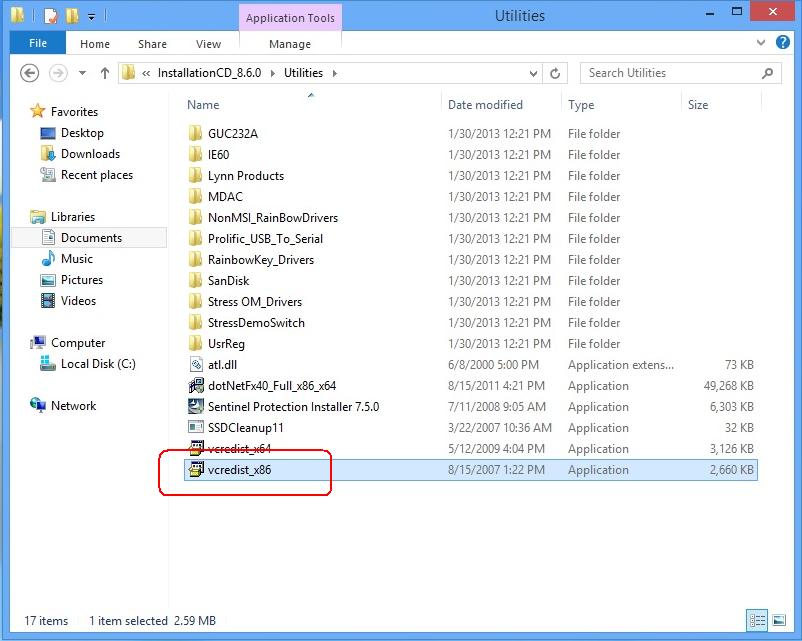
From the installation media, locate the "Utilities" folder and install "vcredist_x86.exe."
Step 2:
Next, locate the "setup.exe" install file for IQmanager®.
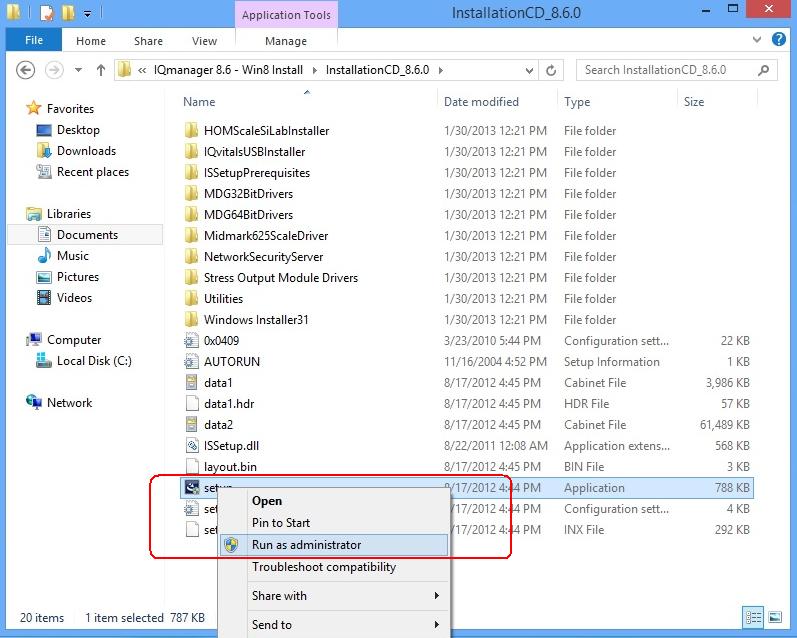
The installation should complete with no errors.
For additional information,contact Midmark Support Services at 1-800-624-8950, option #2.
Windows is a registered Trademark of Microsoft Corporation.
IQmanager is a registered Trademark of Midmark Corporation.